 Algo AI 360
Best Background Remover for Product Photos in 2026 (Amazon, Etsy & eBay Sellers)
The short version
If you clean up product photos in volume and you're tired of monthly fees, a pay-once desktop app like Cutout ($49) wins on cost and Amazon white-background compliance. For the occasional one-off, remove.bg or the free tier of Photoroom are plenty. Phone-first? Photoroom or Pixelcut. Below is who each tool is really for, with 2026 pricing.
If you sell physical products online, your photos do a lot of the selling, and Amazon actually requires a pure-white background (RGB 255, 255, 255) on your main listing image, with the product filling about 85% of the frame and no text, logos, props or watermarks. A cluttered or slightly-grey background can get a listing suppressed or just quietly convert worse. The tools below all remove backgrounds well in 2026; the real differences are cost over time, whether they run offline, batch workflow, and whether they help you hit marketplace rules.
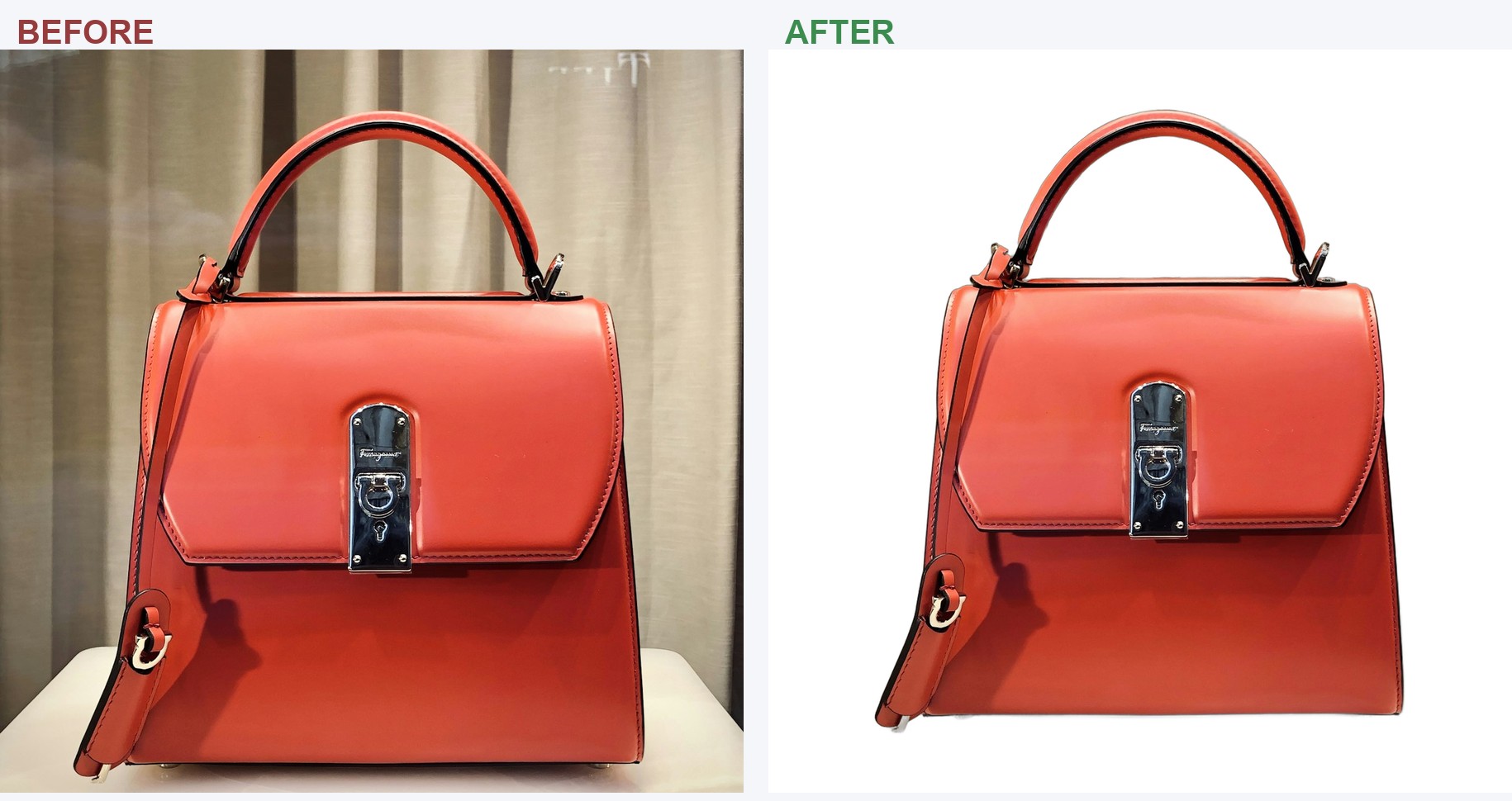
Quick comparison
| Tool | 2026 pricing | Offline | Batch | Amazon white-bg help | Best for |
|---|---|---|---|---|---|
| Cutout | $49 one-time | Yes | Yes, unlimited | Built-in check | Sellers doing volume, no subscriptions |
| remove.bg | From ~$3 pay-as-you-go / subscription | No (web/API) | Plan-limited | No | Occasional one-offs, tricky edges |
| Photoroom | Free tier; Pro subscription | No | Pro tiers | Partial (templates) | Phone-first creators, templates |
| Pixelcut | Free; Pro ~$10/mo | No | Pro | Partial | Free mobile, product shots |
| Adobe Express | Free tier; Creative Cloud | No | Limited | No | People already in Adobe |
| Canva | Subscription (Pro) | No | Yes (Pro) | No | All-in-one design users |
| Clipdrop | Free tier; subscription | No | Limited | No | Quick web removals |
| inPixio | Subscription (desktop) | Desktop | Limited | No | General photo editing |
How to read this
There's one question that decides most of it: how often do you actually process photos? If it's occasionally, a free or pay-as-you-go web tool is the sensible answer and you'll never feel the cost. If you list products regularly, the monthly fees and per-image credits add up, and a one-time desktop tool with batch processing starts to win, which is the gap Cutout is built for. Keep that in mind as you read.
The tools, ranked for sellers
1Cutout: best for sellers who process real volume
- Pricing $49 one-time, so you own it, no subscription, no per-image fee
- Standout Runs offline, unlimited batch, and a built-in Amazon white-background compliance check
- The catch Windows desktop only (no phone app); more than you need for a single one-off removal
Cutout is a desktop app, not a web tool: you point it at a folder of phone photos and it removes backgrounds, drops products onto clean white or custom backdrops, adds badges/watermarks, sizes for Amazon/Etsy/eBay, and checks whether your main image meets Amazon's pure-white rule before you upload. Because it's a one-time purchase that runs on your own machine, the cost doesn't scale with how many photos you push through it, and your images never leave your computer. For a seller doing dozens or hundreds of listings, that's the whole argument. If you only need to zap one background now and then, it's overkill; grab a free web tool instead.
2remove.bg: best for occasional, tricky one-offs
Update, October 2026: remove.bg's standalone website closes on 1 December 2026; background removal moves into Canva and unused pay-as-you-go credits expire that day (per remove.bg's FAQ). See what sellers should do.
- Pricing From about $3 pay-as-you-go, plus subscription plans
- Standout Excellent edge quality, especially hair and fine detail; strong API for developers
- The catch Costs scale with use; images upload to their servers; no seller-specific features
remove.bg is still the one people reach for when the cutout itself is the hard part: loose hair, fur, semi-transparent edges. It's fast, browser-based, and the developer API is genuinely good. For a seller it's a fine choice at low volume, but the pay-per-image/subscription model is exactly what makes high-volume users look for a flat-rate tool.
3Photoroom: best for phone-first creators
- Pricing Free tier (with limits); Pro subscription
- Standout Strong mobile app, nice template library, quick lifestyle backgrounds
- The catch No offline desktop batch; built more for content creation than marketplace compliance; some "guarantee" language is a credit-back formula, not a plain refund
If you live in your phone and want to go from photo to styled post in a minute, Photoroom is excellent, and the free tier covers a lot. It's less suited to a desktop, batch-everything, hit-Amazon's-exact-spec workflow.
4Pixelcut: best free mobile option
- Pricing Free; Pro around $10/mo
- Standout Genuinely useful free mobile product-photo features, no forced watermark
- The catch Mobile/web focused; advanced features behind Pro
A strong pick if you want to do it from your phone for free. Like Photoroom, it's creation-first rather than marketplace-compliance-first.
5Adobe Express & 6Canva: best if you already live there
- Pricing Adobe Express has a free tier; Canva background removal is a Pro feature
- Standout Background removal baked into a full design suite you may already pay for
- The catch Neither is built for Amazon-spec product listing; removal is one feature among hundreds
If you're already designing in Adobe or Canva, using their built-in remover saves a step. Just don't expect marketplace-specific checks.
7Clipdrop & 8inPixio: fine, but not seller-focused
- Pricing Clipdrop: free tier + subscription. inPixio: subscription desktop app
- Standout Clipdrop is a quick web removal; inPixio bundles broader photo editing
- The catch Neither targets the seller's batch + compliance workflow; inPixio has no free version
The verdict
Match the tool to your volume. Occasional one-off, tricky edges → remove.bg. Want it free on your phone → Photoroom or Pixelcut. Already in Adobe/Canva → use their built-in remover. But if you're an online seller cleaning up real volume, hate recurring fees, and want your main images to actually pass Amazon's white-background rule, a pay-once desktop tool like Cutout is the one that fits: buy it once, batch a whole folder, done.
FAQ
What exactly does Amazon require for the main image?
A pure-white background (RGB 255, 255, 255), the product filling roughly 85% of the frame, in focus, with no text, logos, borders, props or watermarks. The image should be at least 1000 px on the longest side (1600+ recommended for zoom).
Do I need a paid tool at all?
No. For a handful of images, free tiers (Photoroom, Pixelcut, Adobe Express) or pay-as-you-go (remove.bg) are fine. Paid/one-time tools earn their keep once you're doing volume regularly.
Why would I choose a desktop app over a web tool?
Three reasons sellers cite: your photos stay on your computer, there's no per-image meter, and you can batch a whole folder at once instead of uploading one at a time.
Which is best for tricky edges like hair or fur?
remove.bg still has an edge on the hardest cutouts. For typical product shots (a shoe, a bottle, a watch), any of the tools above will do a clean job.